User Guide
Magento Admin Product Preview Plus Extension Overview
Magento Admin Product Preview Plus Extension by BSSCommerce helps administrators to check out the front end page right from Magento admin by just some clicks without saving any configuration. This extension adds preview buttons in Product grid view and Product Edit Page to view the frontend product page directly in the backend. It allows accessing customer and product information easily by clicking to the product and customer names. Magento Admin Product Preview Plus Extension also provides preview buttons in Category and CMS page for linking to the front end of Category and CMS page quickly. Especially, this extension links to shipping address by Google Map to locate customer positions and optimize shipping process.
How does Magento Admin Product Preview Plus Extension work?
1. Add Product Table And Customer Link
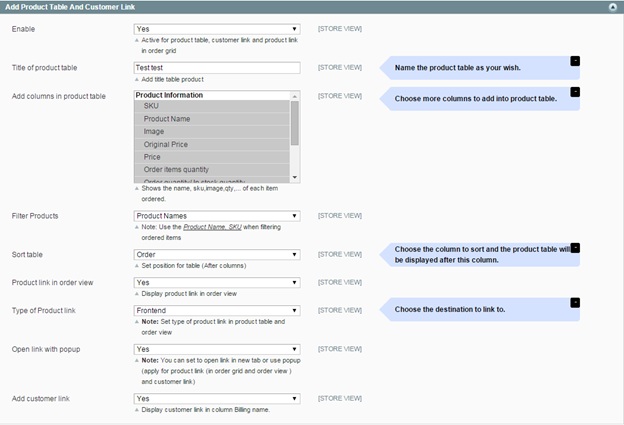
In Enable: Choose Yes to make product table, customer link and product link active or choose No if you want to deactivate them
In Title of product table: You name your own title for product table as your wish
In Add columns in product table: You choose columns that you want to add to the product table such as SKUs, names, images and so on
In Filter Products: You can select Product names or Product SKUs to filter products
In Sort Table: You choose the column to sort and the product table will be displayed behind this column.
In Type of product link: You can choose to link to Frontend or Backend page
In Open link with pop up: Choose Yes to open link in a pop up and choose No to open in a new tab [Please note that this function just applies for product link (in order grid and order view ) and customer link]
In Add customer link: Choose Yes to display customer links in the column “Billing name” or choose No to exclude them.
2. Add Button Preview
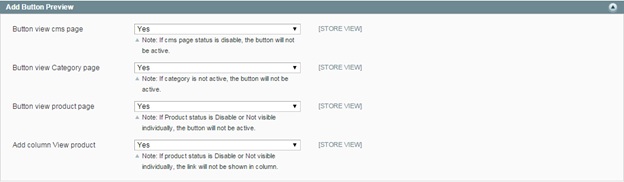
In Button view CMS page: Choose Yes to add preview buttons in Admin-CMS page or choose No to disable them. Please remember that in case CMS page status is Disable, the buttons will not be active.
In Button view Category page: Choose Yes to add preview buttons in Admin-Category page or choose No to disable them. Please remember that in case the category is not active, the button will not be available to use.
In Button view Product page: Choose Yes to add preview buttons in Admin-Product Edit Page or choose No to disable them. Please remember that in case Product status is Disable or Not Visible Individually, the button will not be active.
In Add column View product: Choose Yes to add a column of View product to Admin-Product Grid View or choose No to disable them. Please remember that in case Product status is Disable or Not Visible Individually, the link will not be shown in the column.
3. Google Map For Shipping

In Active Google Map: Choose Yes to link to shipping address by Google Map or choose No to disable this function.