User Guide
Magento Add Multiple Products to Cart Extension Overview
As you know, Magento default does not allow customers to add many products to carts at one time in the product list pages such as category pages and search result pages. Therefore, customers cannot order their desired products with a large quantity when they do not want to visit each product page one by one because it is very time-consuming.
Magento Add Multiple Products to Cart is developed by BSSCommerce to solve this issue and bring better shopping experience for customers. By allowing customers to add multiple items to cart with various quantities at once, they can save a lot of time with the quicker order process than the normal one and also store owners can increase sales well, especially when target customers are wholesalers.
How does Magento Add Multiple Products to Cart Extension work?
You go to System -> Configuration -> Add Multiple Products to start making configuration.
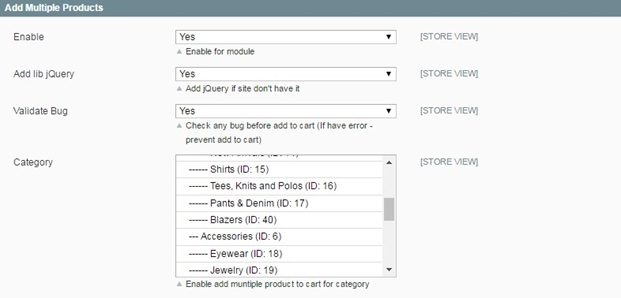
In Enable:
- Choose Yes to enable the module
- Choose No to disable it
In Add Lib jQuery:
- Choose Yes to add Library jQuery if your site doesn’t have it
- Choose No if your site already have it
In Validate bug: in this field, you will select the way to notify errors occurring when customers add products to cart.
- If you choose Yes, a popup of error notification will appear when customers add to cart products without selecting custom options or when no products are added to cart
- If you choose No, error notification will be displayed in the shopping cart for products that customers do not select custom options for them. Other products are still added to cart.

In Category: you select categories that you want to apply this module to. It means that when you choose a category, customers can add multiple products belonging to this category to cart
In Custom Option Product:
- Choose Yes to enable the function of adding multiple products to cart for products with custom options
- Choose No to disable this function for products with custom options
Next, you can choose product types to apply this module:
In Downloadable Product:
- Choose Yes and customers can add multiple downloadable products to cart
- Choose No and there are not check box and quantity box for this product type. It means that customers cannot also add downloadable products along with other product types
In Configurable Product:
- Choose Yes and customers can add multiple configurable products to cart
- Choose No and there are not check box and quantity box for this product type. It means that customers cannot also add configurable products along with other product types
In Bundle Product:
- Choose Yes and customers can add multiple bundle products to cart
- Choose No and there are not check box and quantity box for this product type. It means that customers cannot also add bundle products along with other product types
Finally, you click Save Config and see changes in the frontend.
Note
Magento Add Multiple Products to Cart Extension does not work with pagination of product list pages. It means that if customers select multi products in page 1, they can add all of these products to cart in only page 1, not in other pages